Design Email Journeys That Convert—with Humanic

Email Markup Support: Gmail vs Outlook vs Apple Mail
Unlock the Power of Interactive Emails
Kaushal Sachan, Staff Software Engineer

Email is evolving beyond static messages into dynamic, action-driven experiences. With the right markup—like calendar invites, structured data, and MIME formats—you can enable features such as one-click event saving, RSVP buttons, and real-time order tracking directly inside the inbox. However, platforms like Gmail, Microsoft Outlook, and Apple Mail each support different markup standards. Understanding these differences is key to building reliable, high-converting email systems that work seamlessly across all major clients.
📧 Email Markup Support: Complete Guide (Gmail vs Outlook vs Apple Mail)
🚀 Turn Emails Into Interactive Experiences
Modern email is no longer static. With the right markup, your emails can:
Show Add to Calendar buttons
Enable RSVP / Confirm actions
Display order tracking & reservations
Increase CTR and conversions
However, each email client behaves differently. Understanding these differences is critical for building reliable email systems.
🧩 What is Email Markup?
Email markup refers to structured data or formats embedded inside emails that allow inboxes to:
Understand context (events, orders, bookings)
Render interactive UI elements
Trigger actions (like adding to calendar)
📊 Email Client Support Overview
Feature | Gmail | Outlook | Apple Mail |
|---|---|---|---|
Schema.org Markup | ✅ Yes | ❌ No | ❌ No |
ICS (.ics) | ✅ Yes | ✅ Yes | ✅ Yes |
text/calendar MIME | ⚠️ Partial | ✅ Yes | ✅ Yes |
RSVP Buttons | ⚠️ Limited | ✅ Yes | ✅ Yes |
Interactive Actions | ✅ Yes | ❌ No | ❌ No |
🏆 1. Universal Standard — ICS (.ics)
📌 What it is
The .ics (iCalendar) format is a globally accepted standard for sharing calendar events via email. It allows email clients like Gmail, Microsoft Outlook, and Apple Mail to automatically recognize event details and provide features like “Add to Calendar” or event previews. Because it’s widely supported and easy to generate, .ics serves as the most reliable and compatible way to send event invitations across different platforms and devices.
📄 Example
✅ Supported by:
Gmail
Microsoft Outlook
Apple Mail
🎯 Benefits
Works everywhere:
The.icsformat is universally supported across major email clients like Gmail, Microsoft Outlook, and Apple Mail, ensuring your event details are accessible to all users regardless of platform.Enables “Add to Calendar”:
It allows recipients to instantly add events to their calendar with a single click, reducing friction and increasing the likelihood of attendance.Simple to implement:
Creating an.icsfile requires minimal setup and can be easily generated dynamically in most backend systems, making it developer-friendly.Reliable fallback:
Even if advanced markup like Schema or MIME isn’t supported,.icsensures your core functionality—event scheduling—still works consistently across all email clients.
⚙️ 2. Professional Invites — text/calendar MIME
📌 What it is
A MIME email content type (text/calendar) is a standardized way to send meeting invitations directly within an email, allowing clients like Microsoft Outlook and Apple Mail to recognize the message as a real calendar request rather than a simple attachment. This enables native features such as Accept, Decline, or Tentative responses, automatic calendar blocking, and seamless event updates. Unlike basic .ics files, MIME-based invites are treated as interactive meeting requests, making them ideal for professional and enterprise communication.
📄 Example
✅ Supported by:
Microsoft Outlook
Apple Mail
Partial support in Gmail
🎯 Benefits
Native Accept / Decline buttons
Used by enterprise tools (Zoom, Calendar apps)
Better UX than simple attachments
⚡ 3. Gmail Smart Markup — Schema.org (JSON-LD)
📌 What it is
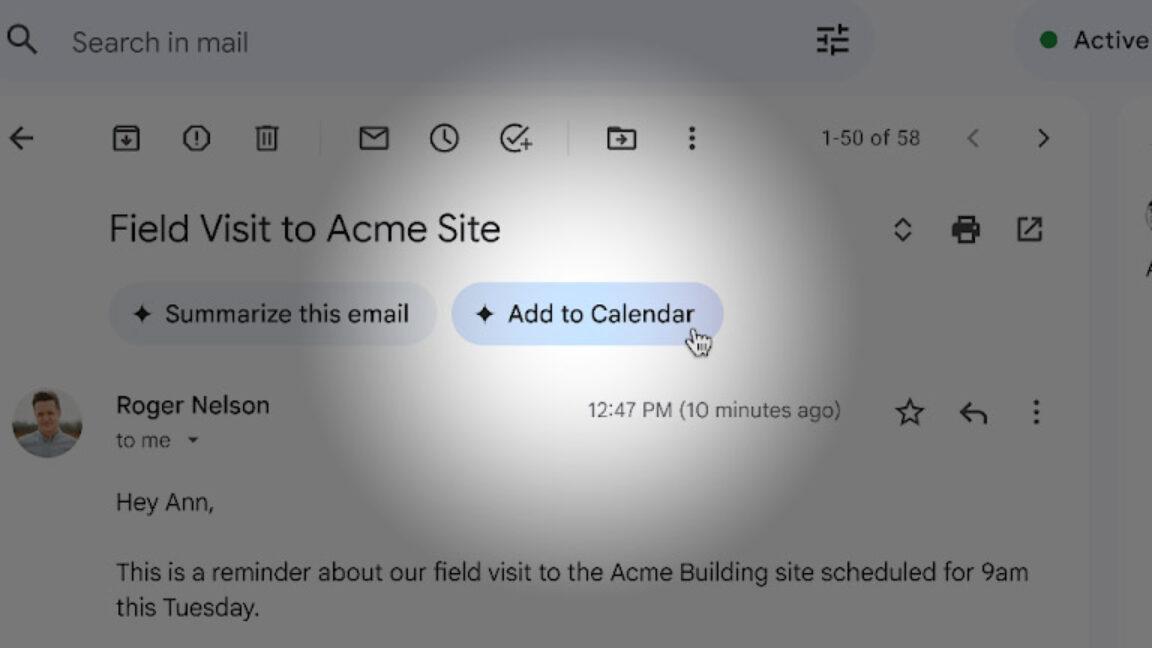
This is a structured data format embedded inside email HTML that allows Gmail to understand the context of your email and render rich, interactive elements directly in the inbox. Using Schema.org (JSON-LD), you can define events, orders, reservations, or actions—enabling features like “Add to Calendar,” “Track Order,” or “Confirm” buttons without opening the email. It enhances user experience and engagement, but works only in Gmail and requires sender authentication and approval to be fully effective.
📄 Example
✅ Supported by:
Gmail only
📦 Gmail Schema Types
Type | Use Case |
|---|---|
Event | Calendar events |
Reservation | Flights, hotels |
Order | Delivery tracking |
Action | Confirm / Approve buttons |
🎯 Benefits
Rich UI inside inbox:
With Schema markup, Gmail can display visually enhanced cards, event summaries, and order details directly in the inbox, reducing the need for users to open the email.Smart action buttons:
It enables interactive buttons like RSVP, Confirm, or Track, allowing users to take action instantly from the email preview itself.Increased engagement:
By making emails more interactive and actionable, users are more likely to respond, click, or complete desired actions—boosting overall engagement and conversions.
⛳️ Previews
⚠️ Limitations
Requires Google approval / whitelisting:
To use Schema markup effectively, your sending domain must be trusted and approved by Google, which involves meeting strict quality and security guidelines.Not supported outside Gmail:
Other email clients like Microsoft Outlook and Apple Mail do not support this markup, so these enhancements will only be visible to Gmail users.🧠 Real-World Strategy (Used by Top Platforms) like:Google Calendar
Microsoft Outlook
👉 Use a hybrid approach:
✅ Recommended Stack
ICS file → universal compatibility
text/calendar MIME → RSVP buttons
Schema.org → Gmail enhancement
🔥 Humanic.ai Advantage (Positioning Section)
If you're building modern email systems, platforms like Humanic.ai can leverage:
AI-generated emails with embedded calendar + schema markup
Smart personalization (region, language, behavior)
Domain reputation optimization
Spam-safe delivery with structured markup
👉 This combination ensures:
Better inbox visibility
Higher engagement
Seamless user experience
💡 Use Case Mapping
Use Case | Recommended Format |
|---|---|
Meeting invites | ICS + MIME |
Event campaigns | ICS + Schema |
SaaS notifications | Schema + fallback |
E-commerce emails | Schema (Gmail) |
🏁 Final Takeaway
No single email markup works everywhere—Gmail supports Schema for rich interactions, while Microsoft Outlook and Apple Mail rely on ICS/MIME. Combining all three ensures universal compatibility, better engagement, and a seamless user experience.
ICS → must-have baseline
MIME → professional standard
Schema → Gmail-only enhancement
👉 The winning approach is combining all three


Made with ❤️ in California